

Choose a routine that fits the task
Open the timer controls and switch to Pomodoro. Choose the income source for the session and select a saved preset. Use the Pomodoro configuration to adjust focus and break durations to the kind of work you are doing.
A shorter routine can suit a small task; a longer focus interval can suit uninterrupted work. Save a preset when you want to return to the same timings.
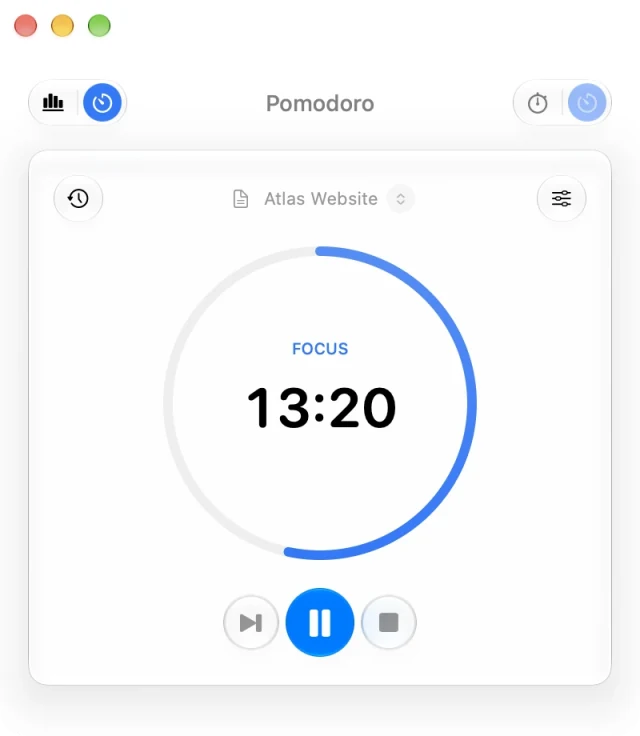
Run and pause a focus session
- Start the focus interval when you are ready to work.
- Pause if you need to interrupt the session, then resume from the same controls.
- Follow the current focus or break phase in the timer.
- When finished, review the recorded work in Timer history.
You can close the controls and continue working in another app. Reopen them from the sidebar widget or menu-bar panel without stopping the session.
Set completion notifications and sounds
Review both the app-wide settings in Settings → Notifications and the Pomodoro completion preferences. Notifications and sound are separate choices, so you can use a visual reminder without an audible alert.
If a completion notification does not appear, check whether macOS allows notifications for MonthMade. Changing a preset alone does not change the system’s permission.
Review the work you completed
Use Timer history to name or edit a saved focus session. For hourly sources, a saved work or focus session can be marked Billable. Breaks should not be treated as billable work; check the phase and source while editing.
See the time-tracking guide for how billable sessions interact with scheduled income. Pomodoro, its presets, and session history are available in Free.
Free for Mac · macOS 14 or later