

Start with the right period
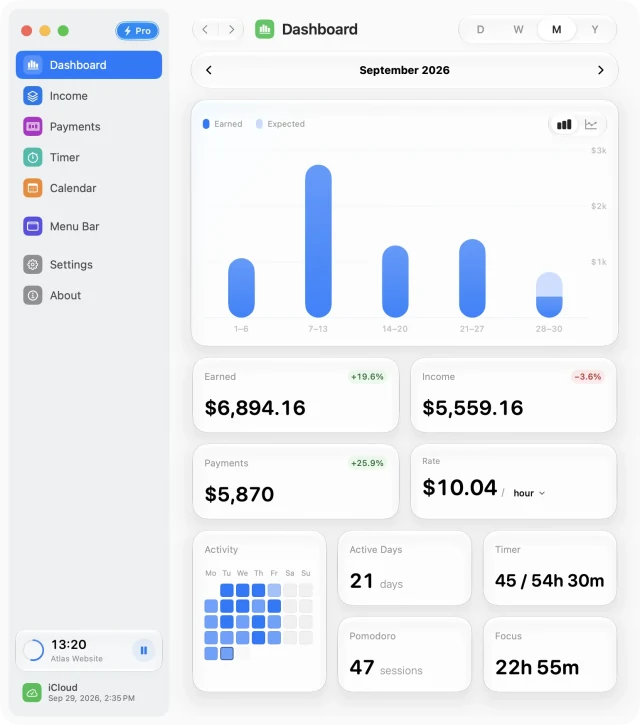
Dashboard brings the income plan and your recorded activity into one view. Before comparing figures, select the period you want to inspect: day, week, month, or year. Use the date navigation to move to the previous or next period.
Compare like with like
- Use the chart’s period and date controls to keep every comparison on the same range.
- Choose columns to compare individual days or a cumulative line to follow progress through the period.
- Use the earned and expected visibility controls to focus the chart. Compare Earned, Income, and Payments according to the question you are trying to answer.
A payment record and calculated earnings describe different things. Recording a payment does not mean your scheduled work took place, and a scheduled earning is not confirmation that money reached your bank. Use payment statuses to keep those distinctions clear.
Use the rate and time views
The Rate card relates accrued income to scheduled time for sources active in the selected period. Switch its unit to see the rate per second, minute, hour, or workday.
Time activity comes from saved sessions. The heatmap and time summaries can help you spot busy days or gaps in your records. Start and manage a timer from Timer, the sidebar timer widget, or the menu-bar panel.
Trace a total back to its source
- Check the selected period and the income source’s active dates.
- Review the rate model, working hours, and breaks.
- Look for Calendar overrides, including paid leave and half days.
- Review additional payments and saved billable sessions linked to hourly sources.
For a day-by-day explanation, open Calendar and select the date. If the result still seems wrong, the income-source guide walks through the inputs.
Free for Mac · macOS 14 or later